Yes, this map is dull
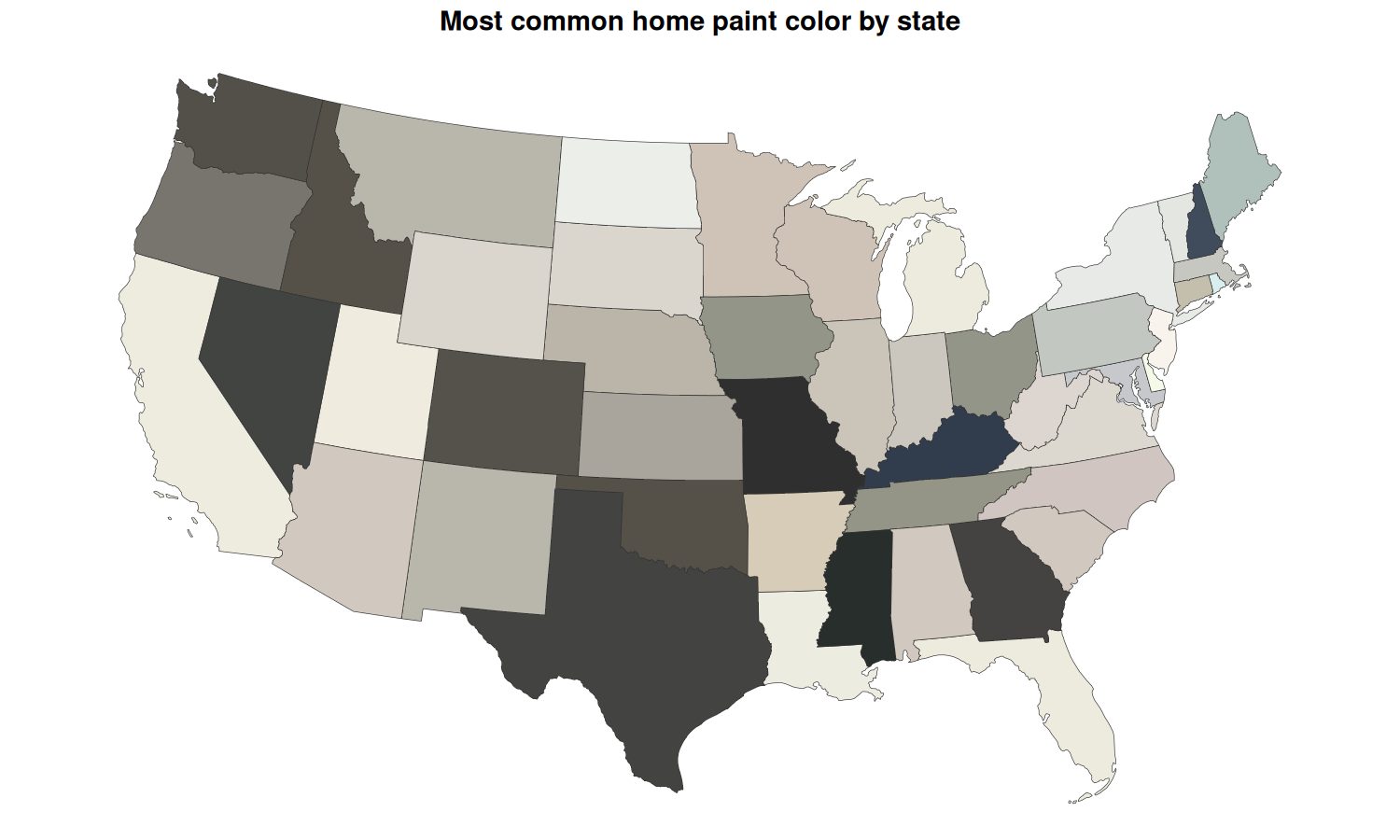
Yes, this map is dull.
Yes, it uses a color called “Accessible Beige”.
Both of these are true because the map is showing real data: the most common color of homes in each US state.
I pulled this visual from a great bit of work by Stewart Hicks, where he describes many of the cultural motivations behind the colors we choose to paint our homes and how they have changed over time. The video is linked at the bottom of this post.
My take is that the reason so many people are compelled to use these colors on their homes is the same reason they look so bad on a map.
The colors don’t stand out from the crowd. Maps thrive on clarity, homes sell on conformity.
Now maps and homes use color for very different purposes, so it would be wrong to say that one color choice is truly better than the other. Yet seeing the color “Accessible Beige” made me very happy that I get to suggest colors in my line of work that use descriptors like “bright” or “orange”. Cheers to saturated colors on maps!
In case you’re interested, I regenerated the map above raising the saturation of the colors to 25,50,and 100%. It makes for a much clearer visual, though we do lose the extra context of just how boring most of the paint on our homes is.
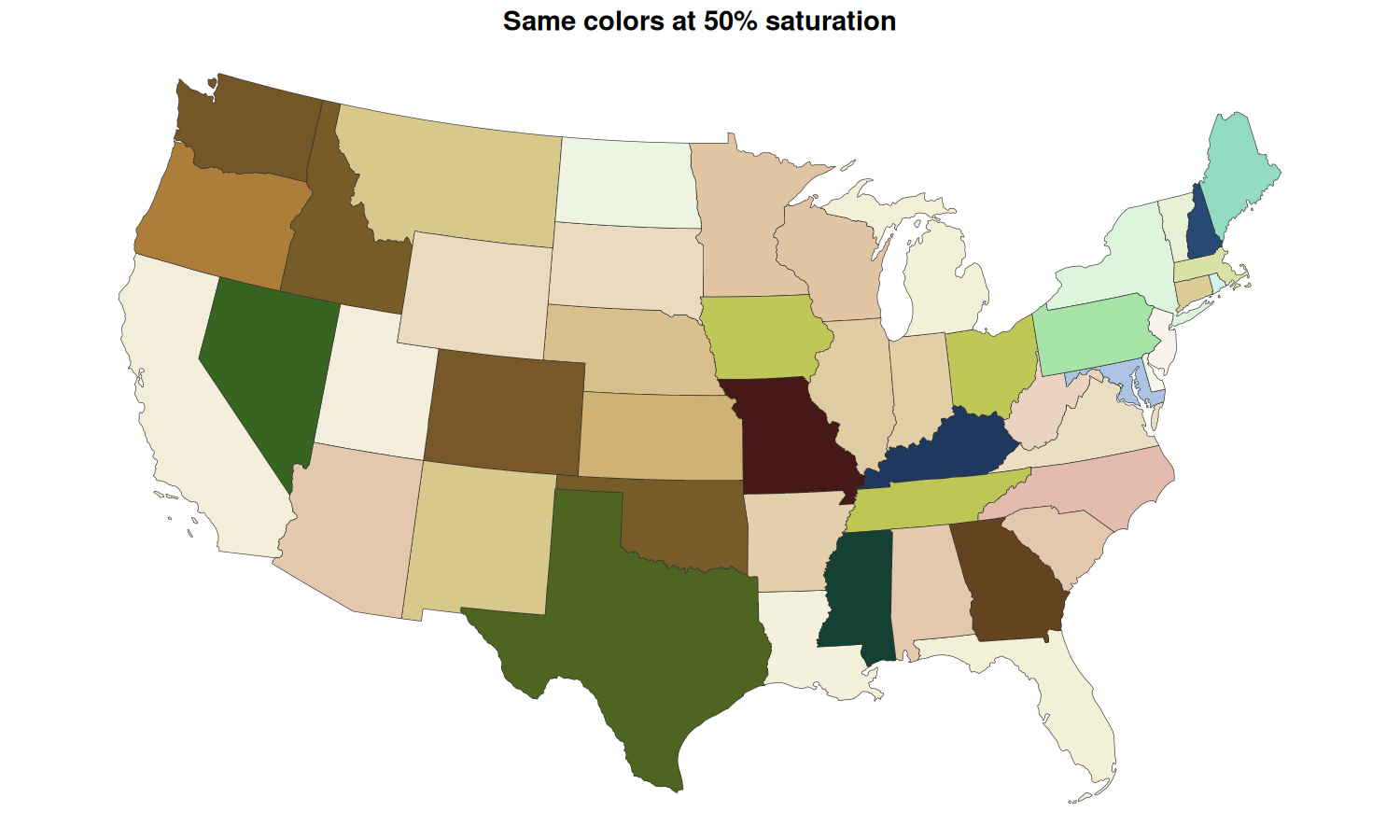
The rest of this post is how that was done.
Where the colors came from
I could not find the underlying dataset the video was built from, so I made my own. I paused the video and used a color dropper tool on each state to pull a hex code. That means the values are an approximation of an approximation: the video’s rendering, then my screen, then the pixel I happened to click.
library(sf)
library(dplyr)
library(tidyr)
library(ggplot2)
library(colorspace)
library(leaflet)
library(htmlwidgets)

state_colors <- read.csv("stateColor.csv", stringsAsFactors = FALSE) %>%
  # Keep only rows with a real hex code (drops the N/A rows for AK and HI)
  filter(grepl("^#", Hex.Code))

head(state_colors, 8)
##         State Abbreviation Hex.Code
## 1     Alabama           AL  #d1c8bf
## 2     Arizona           AZ  #d1c8bf
## 3    Arkansas           AR  #d6ccb8
## 4  California           CA  #eeebdf
## 5    Colorado           CO  #55514b
## 6 Connecticut           CT  #c4bfad
## 7    Delaware           DE  #f5f9e7
## 8     Florida           FL  #ecebdd
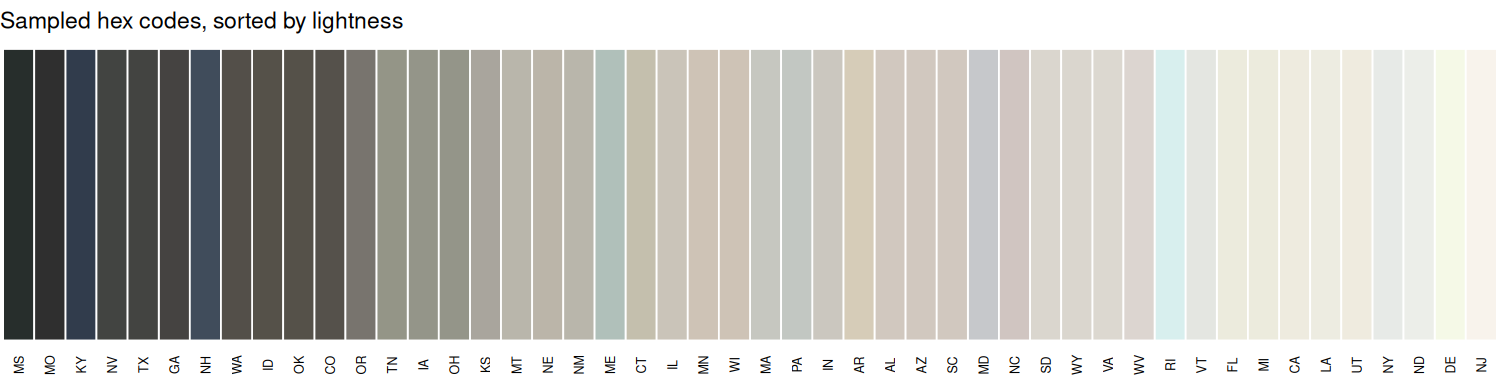
Here is the whole palette as sampled. The point of the plot is not any single color. It is how narrow the range is.
swatch_order <- state_colors %>%
  mutate(L = as(hex2RGB(Hex.Code), "HLS")@coords[, "L"]) %>%
  arrange(L) %>%
  pull(Abbreviation)

state_colors %>%
  mutate(Abbreviation = factor(Abbreviation, levels = swatch_order)) %>%
  ggplot(aes(x = Abbreviation, y = 1, fill = Hex.Code)) +
  geom_tile(color = "white", linewidth = 0.4) +
  scale_fill_identity() +
  labs(title = "Sampled hex codes, sorted by lightness", x = NULL, y = NULL) +
  theme_void() +
  theme(axis.text.x = element_text(size = 6, angle = 90, vjust = 0.5),
        plot.title = element_text(size = 11))
The color trick: force saturation, keep everything else
A hex code is red, green, and blue. That is convenient for screens and useless for reasoning about how a color looks. The colorspace package can convert a color into HLS space, where each color is described by three things that map to how we talk about paint:
- Hue: where the color sits on the wheel (is this beige leaning red or leaning yellow?)
- Lightness: how close to white or black it is
- Saturation: how far from grey it is
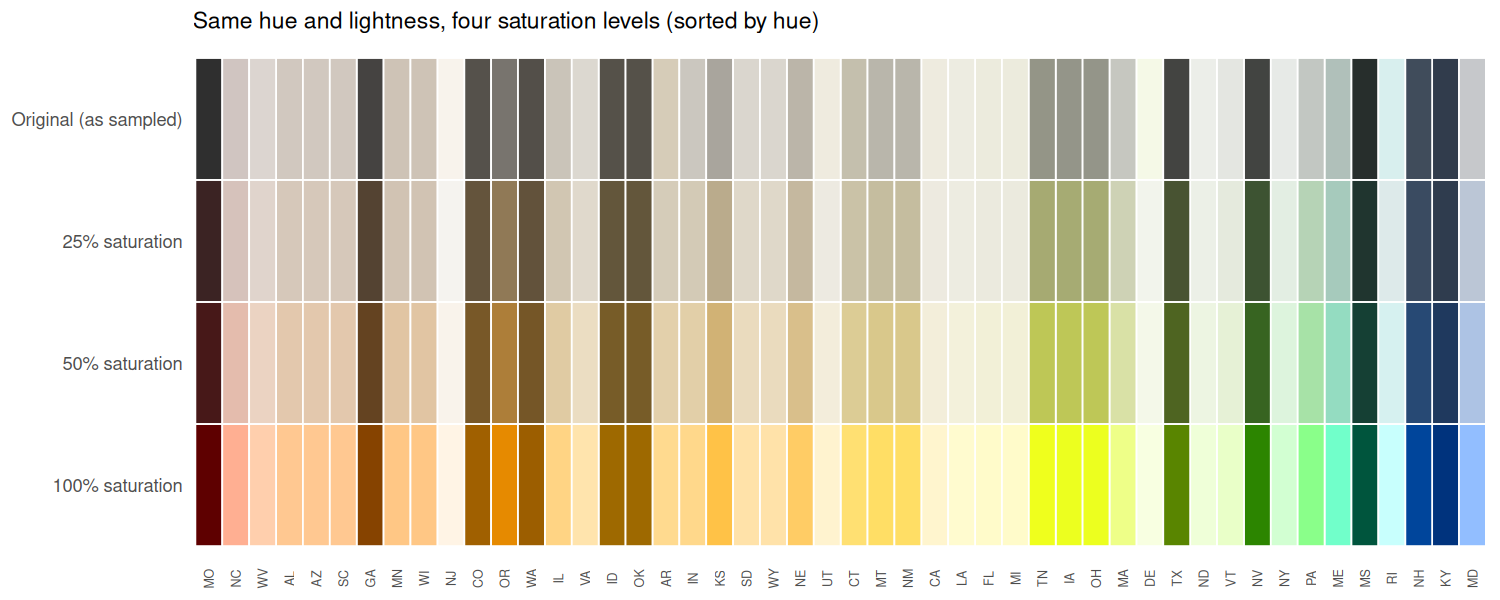
Every color in this dataset has a hue. It is just hidden behind very low saturation. So the method is one line: convert to HLS, overwrite the saturation channel with a fixed value, convert back. Hue and lightness are untouched, so a light warm beige stays a light warm color, it just stops hiding.
force_saturation <- function(hex_codes, saturation_level) {
  rgb_vals <- hex2RGB(hex_codes)
  hls_vals <- as(rgb_vals, "HLS")
  hls_vals@coords[, "S"] <- saturation_level
  hex(hls_vals)
}

state_colors <- state_colors %>%
  mutate(
    hex_original = Hex.Code,
    hex_sat_25   = force_saturation(Hex.Code, 0.25),
    hex_sat_50   = force_saturation(Hex.Code, 0.50),
    hex_sat_100  = force_saturation(Hex.Code, 1.0)
  )
Reshaping to one row per state per saturation level makes the effect easy to see. Each column below is a state. The top row is what I sampled, and each row below it pushes saturation up while holding hue and lightness fixed.
palette_levels <- c(
  hex_original = "Original (as sampled)",
  hex_sat_25   = "25% saturation",
  hex_sat_50   = "50% saturation",
  hex_sat_100  = "100% saturation"
)

colors_long <- state_colors %>%
  select(State, Abbreviation, all_of(names(palette_levels))) %>%
  pivot_longer(all_of(names(palette_levels)), names_to = "palette", values_to = "hex") %>%
  mutate(palette = factor(palette_levels[palette], levels = palette_levels))

hue_order <- state_colors %>%
  mutate(H = as(hex2RGB(Hex.Code), "HLS")@coords[, "H"]) %>%
  arrange(H) %>%
  pull(Abbreviation)

colors_long %>%
  mutate(Abbreviation = factor(Abbreviation, levels = hue_order)) %>%
  ggplot(aes(x = Abbreviation, y = palette, fill = hex)) +
  geom_tile(color = "white", linewidth = 0.4) +
  scale_fill_identity() +
  scale_y_discrete(limits = rev) +
  labs(title = "Same hue and lightness, four saturation levels (sorted by hue)",
       x = NULL, y = NULL) +
  theme_minimal() +
  theme(axis.text.x = element_text(size = 6, angle = 90, vjust = 0.5),
        panel.grid = element_blank(),
        plot.title = element_text(size = 11))
The maps
State boundaries come from the Census Bureau cartographic files via tigris.
spatial_cache_file <- "us_states_filtered.rds"

if (file.exists(spatial_cache_file)) {
  us_states <- readRDS(spatial_cache_file)
} else {
  options(tigris_use_cache = TRUE)
  us_states <- tigris::states(cb = TRUE, resolution = "20m") %>%
    filter(!STUSPS %in% c("PR", "VI", "GU", "AS", "MP", "AK", "HI")) %>%
    st_transform(4326)
  saveRDS(us_states, spatial_cache_file)
}

map_data <- us_states %>%
  left_join(state_colors, by = c("STUSPS" = "Abbreviation"))
Four static versions side by side. Same data, same geometry, only the saturation channel changes.
map_long <- map_data %>%
  select(STUSPS, NAME, geometry, all_of(names(palette_levels))) %>%
  pivot_longer(all_of(names(palette_levels)), names_to = "palette", values_to = "hex") %>%
  mutate(palette = factor(palette_levels[palette], levels = palette_levels)) %>%
  st_transform(5070)   # Albers equal area for the lower 48

map_grid <- ggplot(map_long) +
  geom_sf(aes(fill = hex), color = "#333333", linewidth = 0.15) +
  scale_fill_identity() +
  facet_wrap(~palette, ncol = 2) +
  labs(title = "Most common home paint color by state",
       caption = "Hex codes sampled from video frames with a color dropper. Boundaries: US Census Bureau (tigris).") +
  theme_void() +
  theme(strip.text = element_text(size = 12, face = "bold", margin = margin(b = 4)),
        plot.title = element_text(size = 15, face = "bold", hjust = 0.5, margin = margin(b = 8)),
        plot.caption = element_text(size = 8, color = "grey40"),
        plot.background = element_rect(fill = "white", color = NA))

map_grid
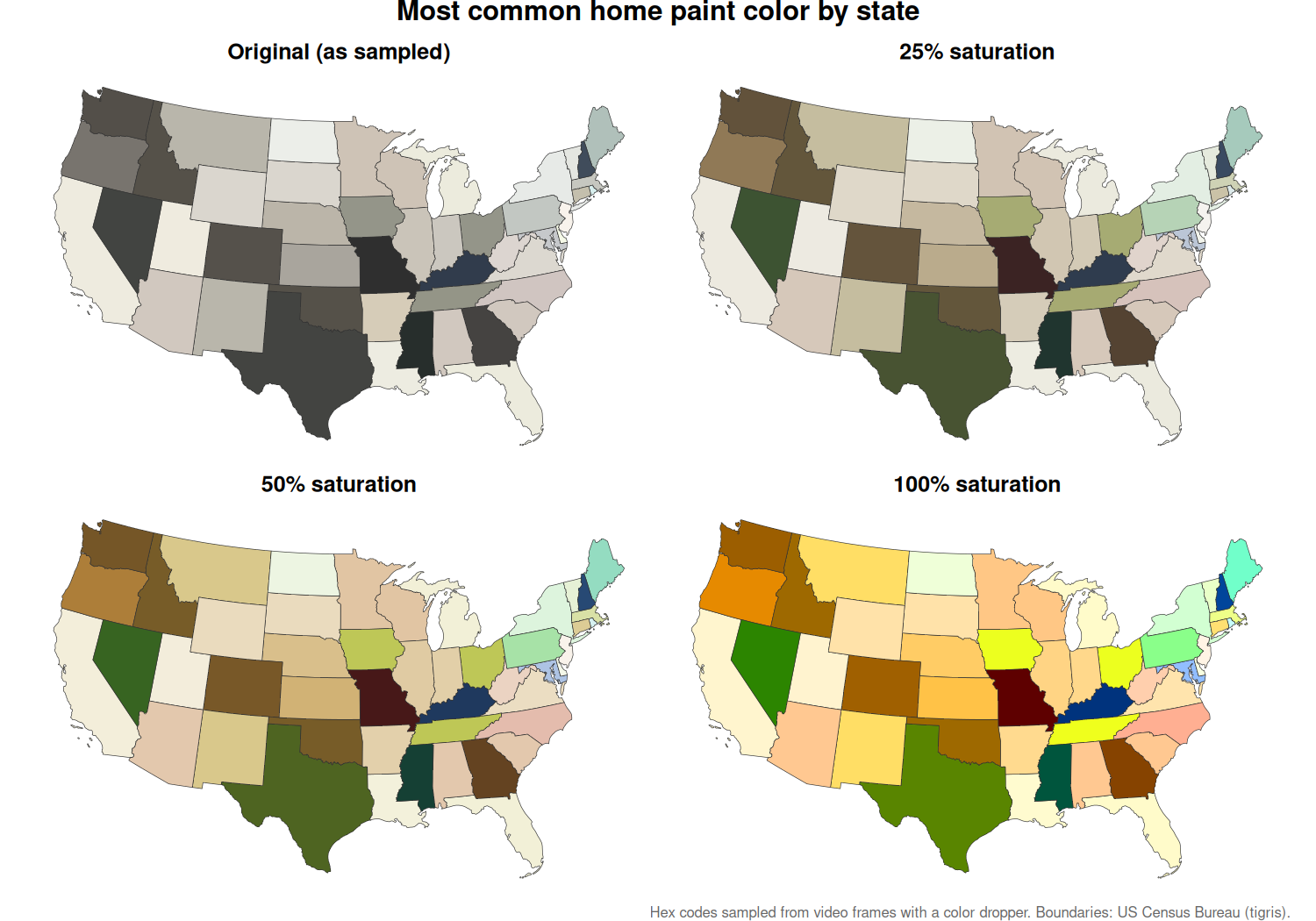
And the interactive version. Use the layer control in the top right to flip between palettes, and hover a state for its hex code.
add_palette <- function(map, column, group) {
  addPolygons(
    map,
    fillColor = map_data[[column]],
    fillOpacity = 1,
    color = "#333333",
    weight = 1,
    group = group,
    label = paste0(map_data$NAME, ": ", map_data[[column]])
  )
}

home_map <- leaflet(map_data) %>%
  addProviderTiles(providers$Esri.WorldGrayCanvas) %>%
  add_palette("hex_original", "Original Palette") %>%
  add_palette("hex_sat_25",   "25% Saturation Palette") %>%
  add_palette("hex_sat_50",   "50% Saturation Palette") %>%
  add_palette("hex_sat_100",  "100% Saturation Palette") %>%
  addLayersControl(
    baseGroups = c("Original Palette", "25% Saturation Palette",
                   "50% Saturation Palette", "100% Saturation Palette"),
    options = layersControlOptions(collapsed = FALSE)
  ) %>%
  setView(lng = -98.58, lat = 39.82, zoom = 4)

saveWidget(home_map, file.path(site_dir, "assets/img/posts/homeColor/homeColor.html"),
           selfcontained = TRUE, title = "Home paint colors by state")
Source
Visual and underlying analysis sourced from “The Problem With Colorful Houses” by Stewart Hicks.
-->